Textguardby MIKODES
  • $29 Regular licence
  • Android · iOS
  • Works offline

Textguard · Flutter app · iOS filter · Node console

A spam filter that shows its work. Your brand, your rules.

Textguard compares a text with written rules and underlines the words that gave it away, with a plain note for each. On iPhone a Message Filter extension sorts unknown senders, offline. Nothing leaves the phone and no model is involved. You edit the rule packs from a console without a new build and sell Pro through the app stores.

Android checks text you share, select or paste: it cannot filter incoming SMS unless it is the default SMS app. The iOS filter only sees unknown senders. Screens show invented example texts, labelled sample data.

Live demo
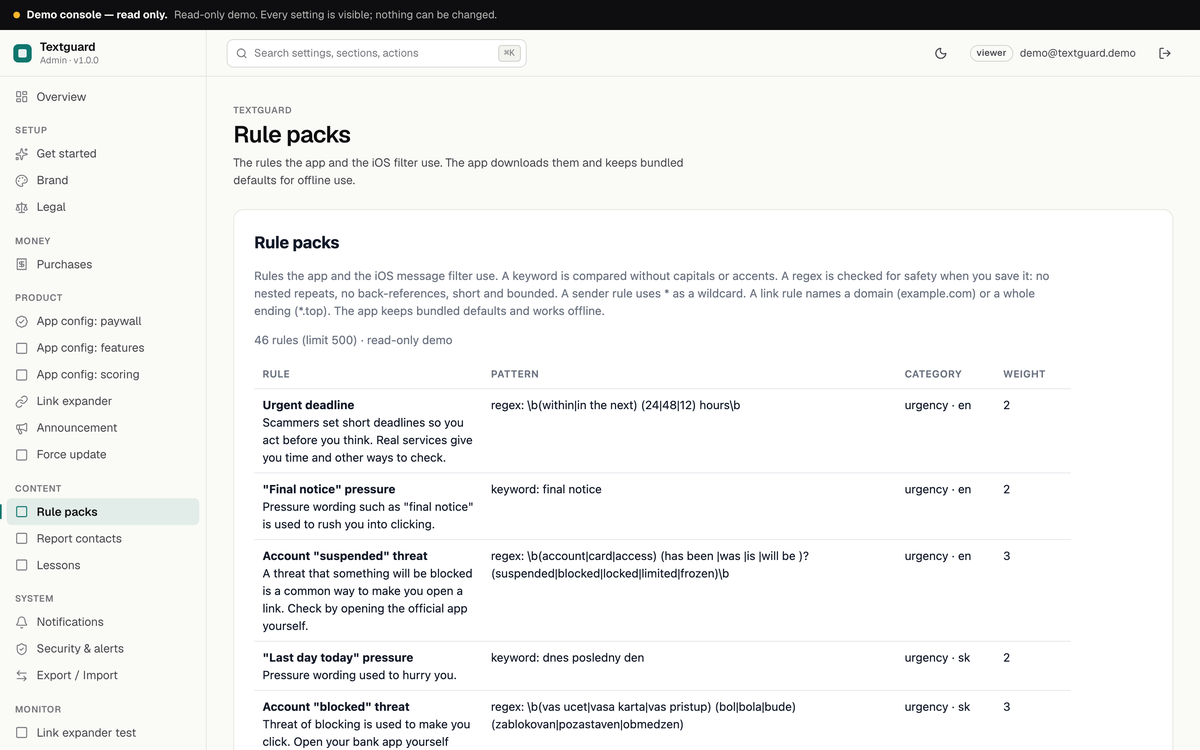
Operator console, Rule packs page with 46 rules, their patterns, categories and weights
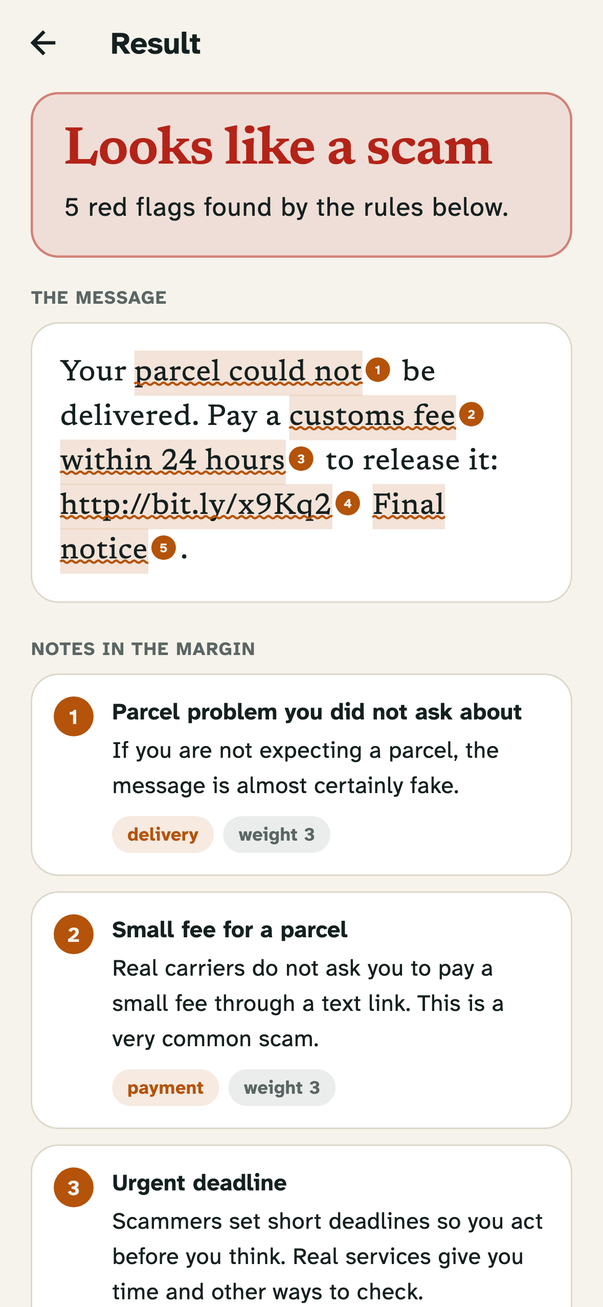
Result for an invented parcel-fee text: Looks like a scam, five flagged words underlined and numbered
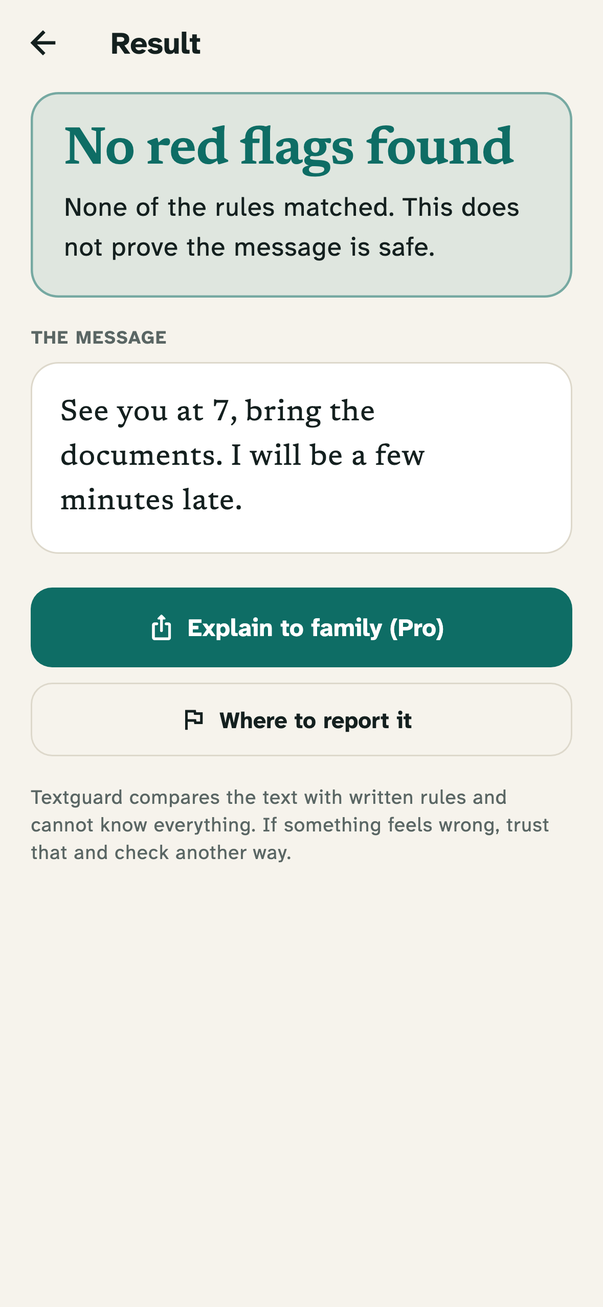
Result No red flags found with the note that this does not prove the message is safe
  • Full source: app, server, console
  • Android · iOS
3
verdicts, never 'safe'
4
rule types: keyword, pattern, sender, link
46
starter rules in the pack
0
server needed to run the app

What you get

Four pieces. One rule pack.

The app and the iOS filter run the same rules on the phone, the server is optional, the console is where you run the business side.

  • Flutter · Android + iOS

    The app

    Check screen, proof-sheet result, lessons, where to report, history without message text, paywall.

  • Swift · iOS 16+

    The iOS filter

    A Message Filter extension that sorts unknown senders into Junk, Promotions and Transactions with the same engine, offline.

  • Node 22+ · SQLite · Docker

    The server

    Serves rules and settings, verifies purchases with Apple and Google, counts opted-in installs, optional link expander.

  • MIKODES Admin Kit

    The console

    Rule packs, report contacts, lessons, scoring, paywall, announcement, force update, revenue, team and audit log.

  • Honest by design

    Never says safe

    Below the threshold it says No red flags found and why that is no promise. Android limits are stated up front.

How you earn

Revenue-ready. Pro is off until you add your ids.

Two mechanisms in the code, both switched in the console. No earnings are claimed here; your price, your audience.

  • Revenue line 01

    Lifetime and yearly Pro

    An in-app purchase paywall with lifetime, yearly and restore. Without Pro a user gets 5 checks a day (a setting); Pro adds unlimited checks, Explain to family and own filter words. No product ids ship, so Pro stays locked until you add yours.

    Console → Product → App config: paywall
  • Revenue line 02

    Server-side purchase check and revenue view

    Apple (signed transactions and Server API) and Google Play checks, off by default, and a view of gross verified store transactions.

    Console → Money → Purchases, Revenue

Screens

Real screens. Sample data.

App screens from a Flutter widget render with invented example texts, console screens from the demo host. Sample data is labelled.

CheckPaste, share or select a text.
Looks like a scamFlagged words underlined and numbered.
Notes in the marginOne plain note per rule.
No red flagsNever claims a text is safe.
Slovak textRules in more than one language.
iPhone filterUnknown senders only, offline.
LessonsEach with an official source.
PaywallLifetime and yearly, locked until you add ids.
OverviewSetup tasks and configuration health.
Rule packsEdit, disable and weigh every rule.
ScoringThresholds without a new build.
PaywallProduct ids and limits.

Features

What is in the code. Nothing that is not.

Each feature points to a file in the source.

  • Proof-sheet result

    Matched words underlined and numbered, one plain note per rule with its category and weight. Links are read out and never opened.

  • Rule engine

    Keyword, pattern, sender and link rules, weights 1 to 5, a cap per category.

  • Regex safety check

    A pattern that could hang the phone is refused in Dart, Swift and the console.

  • iOS Message Filter

    Sorts unknown senders offline; no network URL in the extension.

  • Android share and select

    Share or select text and check it. No SMS permission.

  • Lessons and report offices

    Six lessons and nine offices, each with an official source and review date.

  • Rebrand from one file

    App name, accent, fonts, links, store ids and App Group live in brand.dart; the console changes name, accent and links remotely.

Operator console

One console. Your app, your rules.

The MIKODES Admin Kit: roles, two-factor sign-in and an audit log, with a read-only demo you can open now.

  • Rule packsAdd, edit, disable and reorder rules; patterns are checked on save.
  • ScoringSet when a text is suspicious, a warning, or sent to the iOS spam folder.
  • Paywall and store idsSet product ids, daily limit and the paywall copy without a build.
  • Announcement, force updateMessage every install or block old versions.
  • Team and auditRoles, two-factor sign-in, audit log and configuration history.
Console rule packs list with pattern, category and weight

Pricing

Buy the source. Setup and custom work from us.

One-time licence for the full source. Installation and customization are done by the team that built it.

Source code licence

$29Regular licence

Extended licence $145.

  • Flutter app source for Android and iOS
  • iOS Message Filter extension (Swift)
  • Node server source with Dockerfile and starter rule pack
  • Operator console (MIKODES Admin Kit)
  • Documentation: install, rules, console, store products, release

Installation & customization

Quote

Server, console, your brand and store-ready builds, or any feature you need. Tell us and we quote it.

  • Server and console set up
  • Your brand in the app
  • Store product ids and release builds
Ask for a quote

You bring

  • Automatic filtering of incoming SMS on Android (Play policy)
  • Apple and Google developer accounts, your App Group and store product ids
  • Hosting and domain for the optional server
  • Real-device testing before you release

Documentation

Read it before you buy. Every page is public.

Requirements, installation, rule packs, the console, Android and iOS limits, store products, purchase verification and release.

  • Requirements
  • Installation
  • Rule packs
  • Console guide
  • Android and iOS limits
  • Store products
  • Privacy
  • Release
Read the docs

FAQ

Questions buyers ask. Before they buy.

Does it filter incoming SMS on Android?

No. Google Play lets only the default SMS app read incoming texts, so the Android build checks text you share, select or paste. Automatic filtering there needs a default SMS app that you build yourself.

What does the iOS filter see?

Only texts from senders who are not in the user's contacts, and only after the user switches it on in Settings. It needs your Apple team and your own App Group; the id in the source is a placeholder.

Does it need a cloud service to judge a message?

No. It compares the text with written rules on the phone, so the same text always gives the same answer and every flag points to a rule you can read and edit.

Does it need a server?

No. The app works fully offline with its bundled rules and nothing leaves the phone. The optional server serves rules and settings, verifies purchases and counts installs that opted in.

Is the rule pack complete?

No. It is a starter pack of 46 rules, mostly English and Slovak. Expect misses and false positives, and tune it on your own messages. Nothing was tested on a real device yet.

Is Pro for sale out of the box?

No. No store product ids ship, so Pro stays locked until you add yours in the console or in brand.dart.

Contact

Talk to the people who built it.

Installation and customization: on Telegram or by e-mail, in English.

Telegram · fastest

t.me/mistrba
Talk on Telegram

Email

hey@mikodes.com

For quotes, installation and custom work.

Live demoBuy